



When a starter goes down, every Sorare NBA manager asks the same question: who gets his minutes? Most injury reports stop at "Out, back in two weeks". The new injury report on Sorare NBA Jet goes one step further. It shows who actually steps up, but only when past games prove it.
An NBA injury report grouped by team
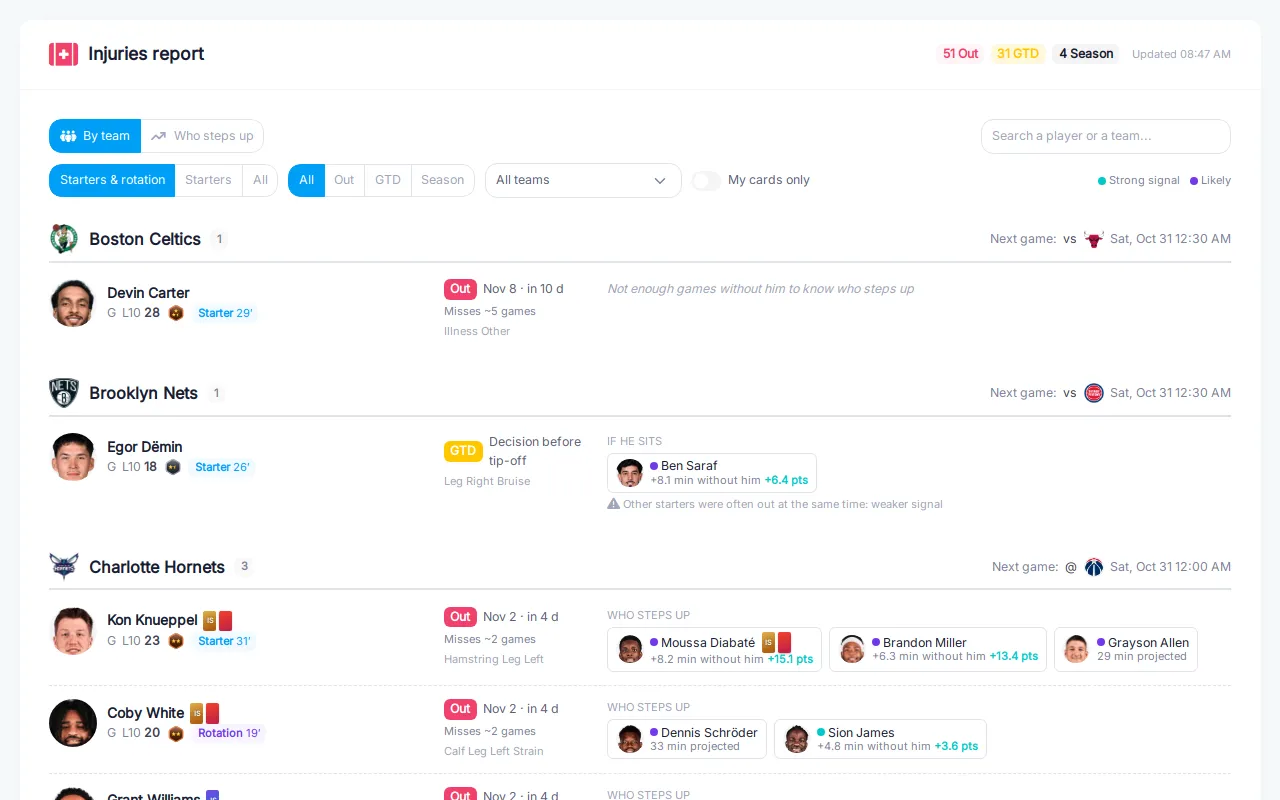
Every injury, team by team, with the next game of each team.
The injury report is now organised by team, so you can see at a glance how hard a roster is hit. For each injured player you get:
- his role: Starter, Rotation or Bench, with his recent minutes per game;
- his status: Out, GTD (game time decision) or out for the season;
- the estimated return date and how many games he is expected to miss, counted on his team's real schedule;
- the injury itself, and his L10 and star rating so you know what he is worth in your lineup.
Each team header also shows its next game, so you know right away whether the injury matters for the current gameweek.
Starters and rotation first: no more bench noise
A third-string centre with a sore ankle does not change your lineup. By default the report only shows starters and rotation players. Switch to Starters to keep only the biggest absences, or All to see every name.
You can also filter by status (Out, GTD, Season), by team, search for a player, and turn on My cards only to keep the injuries that touch your own collection. That filter covers injured players you own and the teammates who replace them.
Who steps up, backed by real games
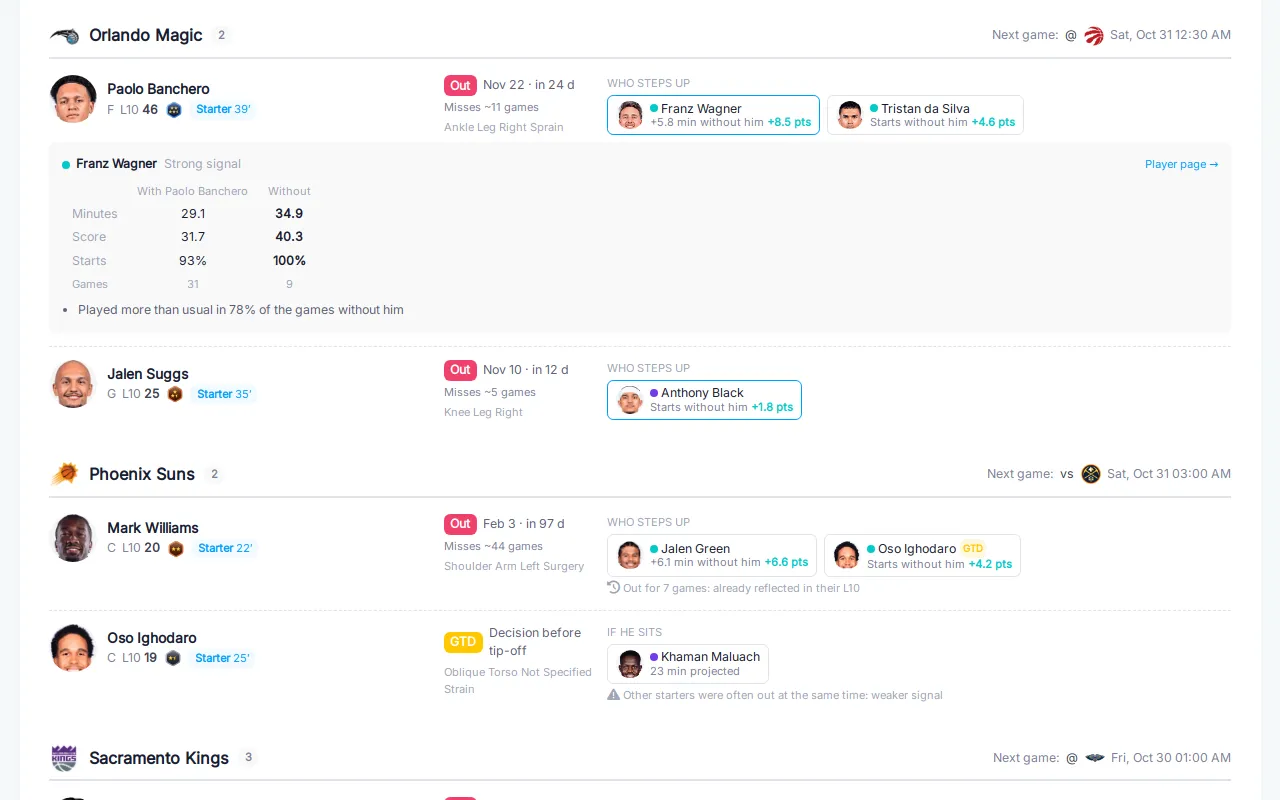 Click a name to see why he is suggested.
Next to each important injury, the report lists the teammates who step up. These names are not guesses from a depth chart. They come from the games the injured player has already missed. For each teammate we compare the games with him and the games without him, for the same team and the current roster:
- minutes with and without him;
- Sorare score with and without him;
- how often he starts in each case;
- how many games the comparison is based on, and how regularly he played more than usual.
Each suggestion carries a confidence level: Strong signal when the evidence is large and consistent, Likely when it is real but thinner. For a GTD player, the section is called If he sits, because the replacement only matters if he ends up not playing.
No data, no guess
Sometimes the honest answer is "nobody in particular", so the report says it:
- Not enough games without him to know who steps up, for a new arrival or a player who has rarely missed games;
- His minutes are spread across the rotation, when no single teammate clearly benefits;
- Out for many games already: his teammates' L10 already includes his absence, so there is no new opportunity to chase.
Games where other starters were out at the same time are put aside, so the minutes are not credited to the wrong absence. When that leaves too little data, the report tells you the signal is weaker.
A "Who steps up" view for your next pickups
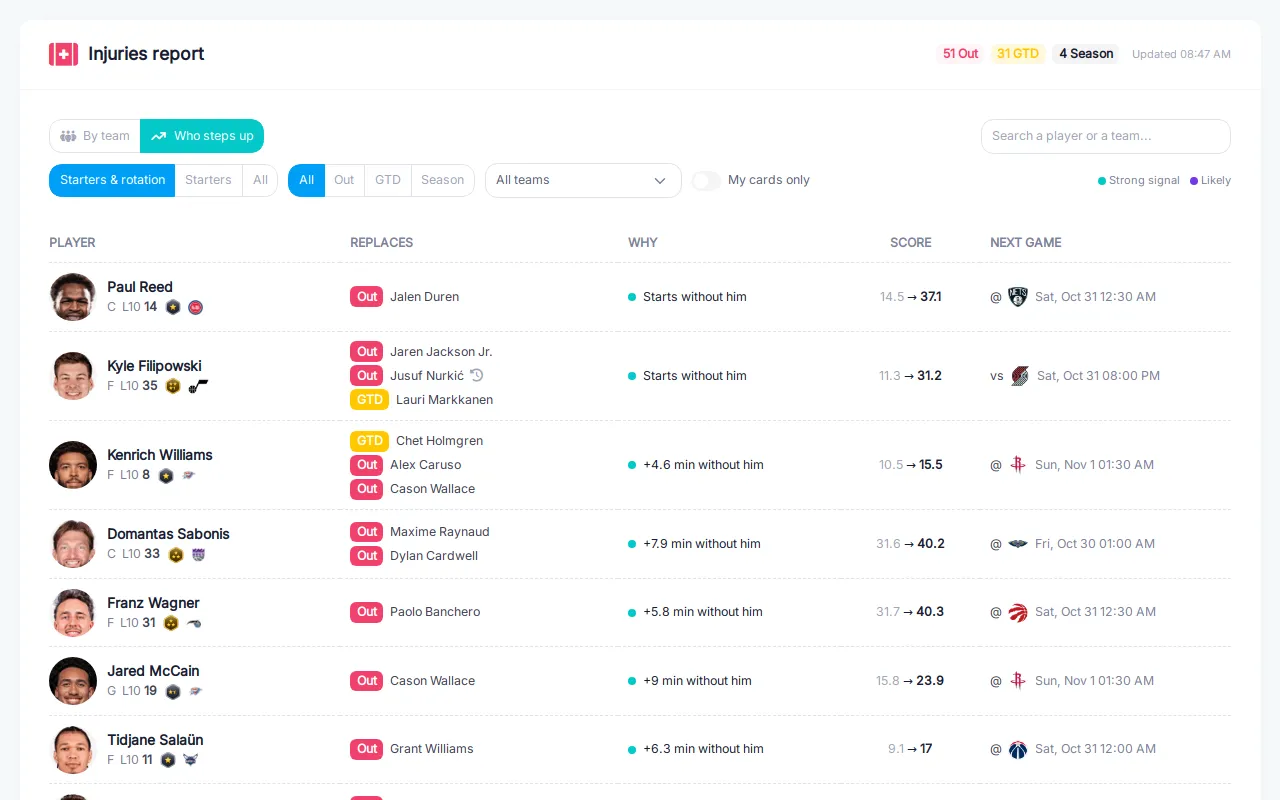 Every replacement in one list, with the injuries he covers and his next game.
The second view flips the report around. Instead of injured players, it lists the teammates who benefit, ranked by confidence and by score gain. Each line shows who he replaces, why he is suggested, his average Sorare score with and without the injured player, and his next game. New opportunities come first. Long absences that are already priced into the L10 come last.
It is a quick way to find a cheap Limited or Rare to slot into your Sorare NBA lineup for the next gameweek, or a card to pick up at auction before the market catches up.
Your cards, In Season included
If you own a card of an injured player or of a replacement, small card icons appear next to his name, in the colour of their rarity. In Season cards show "IS", so you can tell straight away whether the card fits your In Season lineups or only your Classic ones.
How to use it
- Open the injury report before you set your lineup for the gameweek.
- Keep Starters & rotation, and check the teams you play.
- For each starter who is Out, look at Who steps up and click a name to see the evidence.
- Switch to the Who steps up view to list the best replacements across the league, and turn on My cards only to see what you already own.
The injury report is part of the Premium subscription. If you want to prepare your lineups a few days ahead, see also preparing gameweeks ahead with the lineup builder.
 Sign in via Sorare